| This helpfile is used in
context of CTI Client Auto-Configuration. See in CTI Client
menu: [File > Administration > Generate Setup > Step "Auto-Configuration"]
|
| auto_config_schema.xml |
The
auto_config_schema.xml file describes the "schema" of a auto-config
datasource.
You need to edit the schema file according to your auto-config datasource (Registry,
INI- or XML-File).
The schema file is stored in "%PROGRAM_DIR%\auto_config\" - so you may need
admin rights to edit it.
The CTI Client "Setup Generator" has a simple editor for the schema file.
See CTI Client menu: [File > Create Setup > Dialog "Auto-Configuration"].
- If you want to run auto-config by username, you can
use the placeholder %USERNAME% in auto_config_schema.xml. Examples:
SubPath="\auto_config\Users\%USERNAME%\"
SubPath="\auto_config\Users\User?Name=%USERNAME%\"
- If you want to run auto-config by computername, you can
use the placeholder %COMPUTERNAME% in auto_config_schema.xml. Examples:
SubPath="\auto_config\Computers\%COMPUTERNAME%\"
SubPath="\auto_config\Computers\Computer?Name=%COMPUTERNAME%\"
- Terminal Server: New from Version 3.1.046: If you want to run auto-config by
client-computername in a Terminal Server environment, you can
use the placeholder %CLIENTNAME% in auto_config_schema.xml. Examples:
SubPath="\auto_config\Computers\%CLIENTNAME%\"
SubPath="\auto_config\Computers\Computer?Name=%CLIENTNAME%\"
|
| Examples for
auto_config_schema.xml (and auto config data) |
|
|
|
|
Example 1: |
Auto-config parameters are stored in a central XML file for all users.
Drive "N:" is a public network drive. |
|
| |
|
Example 1a: |
If usernames are invalid XML section names (name
contains spaces or other special characters). |
|
N:\cti_client\auto_config_data.xml:
<?xml
version="1.0" encoding="ISO-8859-1"?>
<auto_config>
<Users>
<User
Name="Axel Müller"
TAPI_LineName="PBX Line 200"
/>
<User
Name="Sanda Jensen"
TAPI_LineName="PBX Line 201"
/>
</Users> <Computers>
<Computer
Name="PC1"
TAPI_LineName="PBX Line 203"
/>
<Computer
Name="PC2"
TAPI_LineName="PBX Line 204"
/>
</Computers>
</auto_config> |
auto_config_schema.xml:
<?xml version="1.0" encoding="ISO-8859-1"?>
<auto_config>
<Sources>
<Src1
Path="N:\cti_client\auto_config_data.xml"
SubPath="\auto_config\Users\User?Name=%USERNAME%\"
/>
</Sources>
<Schema
TAPI_LineName="%Src1%\TAPI_LineName"
/>
</auto_config> |
Comments (valid for all examples):
<Schema
TAPI_LineName="%Src1%\TAPI_LineName"
/> |
| TAPI_LineName:
This is the fix parameter name used inside of application.
TAPI_LineName:
This is the parameter name inside your auto-config-datasource. Here you
can choose an other name if you want. For example:
UserTAPIDevice |
If you want to run auto-config by computername, you can
use the placeholder %COMPUTERNAME% in auto_config_schema.xml. Example:
SubPath="\auto_config\Computers\Computer?Name=%COMPUTERNAME%\" |
New from Version 3.1.046: If you want to run auto-config by
client-computername in a Terminal Server environment, you can
use the placeholder %CLIENTNAME% in auto_config_schema.xml. Example:
SubPath="\auto_config\Computers\Computer?Name=%CLIENTNAME%\" |
|
|
|
Example 1b: |
If usernames are valid XML section names (name
contains no spaces or other special characters). |
|
| |
N:\cti_client\auto_config_data.xml:
<?xml version="1.0" encoding="ISO-8859-1"?>
<auto_config>
<Users>
<amueller
TAPI_LineName="PBX Line 200"
/>
<sjensen
TAPI_LineName="PBX Line 201"
/>
</Users>
</auto_config> |
auto_config_schema.xml:
<?xml version="1.0" encoding="ISO-8859-1"?>
<auto_config>
<Sources>
<Src1
Path="N:\cti_client\auto_config_data.xml"
SubPath="\auto_config\Users\%USERNAME%\"
/>
</Sources>
<Schema
TAPI_LineName="%Src1%\TAPI_LineName"
/>
</auto_config> |
|
|
Example 1c:
|
integrated Asterisk Line |
|
N:\cti_client\auto_config_data.xml:
<?xml
version="1.0" encoding="ISO-8859-1"?>
<auto_config>
<Users>
<amueller
AsteriskLine_Channel="SIP/203"
AsteriskLine_DisplayUsername="Axel Müller"
/>
</Users>
</auto_config> |
auto_config_schema.xml:
<?xml
version="1.0" encoding="ISO-8859-1"?>
<auto_config>
<Sources>
<Src1
Path="N:\cti_client\auto_config_data.xml"
SubPath="\auto_config\Users\%USERNAME%\"
/>
</Sources>
<Schema
AsteriskLine_Channel="%Src1%\AsteriskLine_Channel"
AsteriskLine_DisplayUsername="%Src1%\AsteriskLine_DisplayUsername"
/>
</auto_config> |
|
|
Example 1d:
|
integrated Snom, Aastra or Yealink Lines |
|
N:\cti_client\auto_config_data.xml:
<?xml
version="1.0" encoding="ISO-8859-1"?>
<auto_config>
<Users>
<amueller
Phone_IP="192.168.0.3"
Phone_Username="test"
Phone_Pwd="test"
ActionURLs_Port="8080"
/>
</Users>
</auto_config> |
auto_config_schema.xml:
<?xml
version="1.0" encoding="ISO-8859-1"?>
<auto_config>
<Sources>
<Src1
Path="N:\cti_client\auto_config_data.xml"
SubPath="\auto_config\Users\%USERNAME%\"
/>
</Sources>
<Schema
Phone_IP="%Src1%\Phone_IP"
Phone_Username="%Src1%\Phone_Username"
Phone_Pwd="%Src1%\Phone_Pwd"
ActionURLs_Port="%Src1%\ActionURLs_Port"
/>
</auto_config> |
|
|
Example 1e:
|
integrated SIP-SoftPhone |
| |
Only the SIP-User
parameter can set via Auto-Config. The SIP-Server parameters must be
pre-configured in the CTI Client Master and it's the same for all user. |
|
N:\cti_client\auto_config_data.xml:
<?xml
version="1.0" encoding="ISO-8859-1"?>
<auto_config>
<Users>
<amueller
SIP_UserID="201"
SIP_AuthID="201"
SIP_Pwd="topsecret"
SIP_UserDisplayName="Max"
SIP_PhoneNumber="201"
SIP_FirstLocalPort="5060"
Display_as="201"
/>
</Users>
</auto_config> |
auto_config_schema.xml:
<?xml
version="1.0" encoding="ISO-8859-1"?>
<auto_config>
<Sources>
<Src1
Path="N:\cti_client\auto_config_data.xml"
SubPath="\auto_config\Users\%USERNAME%\"
/>
</Sources>
<Schema
SIP_UserID="%Src1%\SIP_UserID"
SIP_AuthID="%Src1%\SIP_AuthID"
SIP_Pwd="%Src1%\SIP_Pwd"
SIP_UserDisplayName="%Src1%\SIP_UserDisplayName"
SIP_PhoneNumber="%Src1%\SIP_PhoneNumber"
SIP_FirstLocalPort="%Src1%\SIP_FirstLocalPort"
Display_as="%Src1%\Display_as"
/>
</auto_config> |
|
|
Example 1f:
|
Heterogeneous TAPI devices:
integrated SIP-SoftPhone and Yealink Phones |
| |
See also example 1e and 1d |
CTI Client version 3.1.056 supports a new auto-config parameter "PhoneStack_xml".
The "phone_stack.xml" file determines:
- Which type of TAPI device is bound to the PhoneStack/PhoneDialog.
- PhoneDialog settings.
- Dialing settings.
You will find the "phone_stack.xml" file under:
[File > Working Directory > Open > "local_profiles\COMPUTERNAME\phone\phone_stack"].
Preparatory steps in CTI Client Master:
- SIP-SoftPhone:
- Configure the "SIP-SoftPhone" line and assign it to the
PhoneDialog.
- Configure the PhoneDialog settings and the Dial-Settings.
- Copy the "phone_stack.xml" file and rename it into "phone_stack_softphone.xml".
- Yealink:
- Configure the "yealink line 1" and assign it to the PhoneDialog.
- Configure the PhoneDialog settings and the Dial-Settings.
- Copy the "phone_stack.xml" file and rename it
into "phone_stack_yealink.xml".
|
N:\cti_client\auto_config_data.xml:
<?xml
version="1.0" encoding="ISO-8859-1"?>
<auto_config>
<Users>
<amueller
PhoneStack_xml="phone_stack_softphone.xml"
SIP_UserID="201"
SIP_AuthID="201"
SIP_Pwd="topsecret"
SIP_UserDisplayName="Max"
SIP_PhoneNumber="201"
SIP_FirstLocalPort="5060"
Display_as="201"
/>
<bschmidt
PhoneStack_xml="phone_stack_yealink.xml"
Phone_IP="%Src1%\Phone_IP"
Phone_Username="%Src1%\Phone_Username"
Phone_Pwd="%Src1%\Phone_Pwd"
ActionURLs_Port="%Src1%\ActionURLs_Port"
Display_as="201"
/>
</Users>
</auto_config> |
auto_config_schema.xml:
<?xml
version="1.0" encoding="ISO-8859-1"?>
<auto_config>
<Sources>
<Src1
Path="N:\cti_client\auto_config_data.xml"
SubPath="\auto_config\Users\%USERNAME%\"
/>
</Sources>
<Schema
PhoneStack_xml="%Src1%\PhoneStack_xml"
SIP_UserID="%Src1%\SIP_UserID"
SIP_AuthID="%Src1%\SIP_AuthID"
SIP_Pwd="%Src1%\SIP_Pwd"
SIP_UserDisplayName="%Src1%\SIP_UserDisplayName"
SIP_PhoneNumber="%Src1%\SIP_PhoneNumber"
SIP_FirstLocalPort="%Src1%\SIP_FirstLocalPort"
Display_as="%Src1%\Display_as"
Phone_IP="%Src1%\Phone_IP"
Phone_Username="%Src1%\Phone_Username"
Phone_Pwd="%Src1%\Phone_Pwd"
ActionURLs_Port="%Src1%\ActionURLs_Port"
/>
</auto_config> |
|
|
Example 1g:
|
Heterogeneous TAPI devices:
integrated SIP-SoftPhone and CTI Server TAPI-Lines |
| |
See also example 1e and 1d |
CTI Client version 3.1.056 supports a new auto-config parameter "PhoneStack_xml".
The "phone_stack.xml" file determines:
- Which type of TAPI device is bound to the PhoneStack/PhoneDialog.
- PhoneDialog settings.
- Dialing settings.
You will find the "phone_stack.xml" file under:
[File > Working Directory > Open > "local_profiles\COMPUTERNAME\phone\phone_stack"].
Preparatory steps in CTI Client Master:
- SIP-SoftPhone:
- Configure the "SIP-SoftPhone" line and assign it to the
PhoneDialog.
- Configure the PhoneDialog settings and the Dial-Settings.
- Copy the "phone_stack.xml" file and rename it into "phone_stack_softphone.xml".
- CTI Server TAPI-Lines:
- Assign the CTI Server TAPI-Line to the PhoneDialog.
- Configure the PhoneDialog settings and the Dial-Settings.
- Copy the "phone_stack.xml" file and rename it
into "phone_stack_server.xml".
|
N:\cti_client\auto_config_data.xml:
<?xml
version="1.0" encoding="ISO-8859-1"?>
<auto_config>
<Users>
<amueller
PhoneStack_xml="phone_stack_softphone.xml"
SIP_UserID="201"
SIP_AuthID="201"
SIP_Pwd="topsecret"
SIP_UserDisplayName="Max"
SIP_PhoneNumber="201"
SIP_FirstLocalPort="5060"
Display_as="201"
/>
<bschmidt
PhoneStack_xml="phone_stack_server.xml"
/>
</Users>
</auto_config> |
Hint:
- For user "bschmidt" you only need to set auto-config-parameter "PhoneStack_xml".
The right TAPI-Line will be assigned automaticaly by CTI Server
configuration.
auto_config_schema.xml:
<?xml
version="1.0" encoding="ISO-8859-1"?>
<auto_config>
<Sources>
<Src1
Path="N:\cti_client\auto_config_data.xml"
SubPath="\auto_config\Users\%USERNAME%\"
/>
</Sources>
<Schema
PhoneStack_xml="%Src1%\PhoneStack_xml"
SIP_UserID="%Src1%\SIP_UserID"
SIP_AuthID="%Src1%\SIP_AuthID"
SIP_Pwd="%Src1%\SIP_Pwd"
SIP_UserDisplayName="%Src1%\SIP_UserDisplayName"
SIP_PhoneNumber="%Src1%\SIP_PhoneNumber"
SIP_FirstLocalPort="%Src1%\SIP_FirstLocalPort"
Display_as="%Src1%\Display_as"
/>
</auto_config> |
|
| |
|
|
Example 2: |
Auto-config parameters are stored in a INI file in the user's home drive "H:". |
|
H:\cti_client\auto_config_data.ini:
[auto_config]
TAPI_LineName= PBX Line 200 |
auto_config_schema.xml:
<?xml version="1.0" encoding="ISO-8859-1"?>
<auto_config>
<Sources>
<Src1
Path="H:\cti_client\auto_config_data.ini"
SubPath="\auto_config\"
/>
</Sources>
<Schema
TAPI_LineName="%Src1%\TAPI_LineName"
/>
</auto_config> |
|
| |
|
|
Example 3: |
Auto-config parameters are stored in a XML file in the user's home drive "H:". |
|
H:\cti_client\auto_config_data.xml:
<?xml version="1.0" encoding="ISO-8859-1"?>
<auto_config>
<data
TAPI_LineName="PBX Line 200"
/>
</auto_config> |
auto_config_schema.xml:
<?xml version="1.0" encoding="ISO-8859-1"?>
<auto_config>
<Sources>
<Src1
Path="H:\cti_client\auto_config_data.xml"
SubPath="\auto_config\data\"
/>
</Sources>
<Schema
TAPI_LineName="%Src1%\TAPI_LineName"
/>
</auto_config> |
|
| |
|
|
Example 4: |
Auto-config parameters are stored in Registry. |
|
Registry:
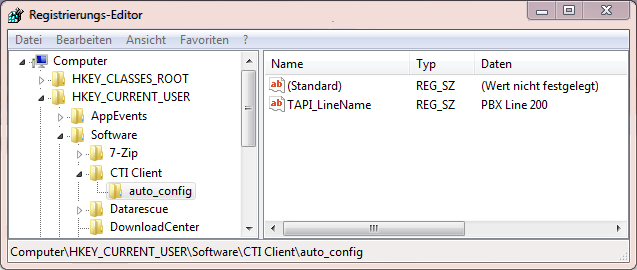
|
|
auto_config_schema.xml:
<?xml version="1.0" encoding="ISO-8859-1"?>
<auto_config>
<Sources>
<Src1
Path="HKEY_CURRENT_USER\Software\CTI Client\auto_config\"
/>
</Sources>
<Schema
TAPI_LineName="%Src1%\TAPI_LineName"
/>
</auto_config> |
|
| |
|
|
Example 5: |
Bind first TAPI-Line from TAPI-Driver. |
|
|
auto_config_schema.xml:
<?xml
version="1.0" encoding="ISO-8859-1"?>
<auto_config>
<Schema
TAPI_LineName="TAPI\%TapiDriver_ProviderName%\%FirstLine%"
/>
</auto_config> |
Situation:
- There are a large number of PCs in your network.
- On every PC the same TAPI-Driver is installed.
- But every PC has its own TAPI-Line (different TAPI-Line-Names).
- In the CTI Client Master the local TAPI-Line is assiged to the PhoneDialog.
So the CTI Client knows the TAPI-Driver's ProviderName.
Auto-Config:
- The CTI Clients will search the TAPI-Driver by the known "ProviderName"
and bind the first TAPI-Line from it.
Hints:
- In this case you would not need an Auto-Config-Data source like in the
other examples.
- Simply copy the content of the Example 5 into the "auto_config_schema.xml"
file.
- The CTI Client will resolve the placeholders %TapiDriver_ProviderName%
and %FirstLine% by itself.
|
| |